Quick Locale Switcher1.2
Publisher Description
IMPORTANT : Because of changes to certain Android permissions in Android 4.2, the application must now be placed in the system/app folder in order to work correctly. In order to do so, the device must be rooted !
Sorry, but right now, there is no other way :(
--
Quick Locale Switcher allows you to switch between locales painlessly. If you're a developer or if you are often switching between locales, Quick Locale Switcher will definitely save you some time.
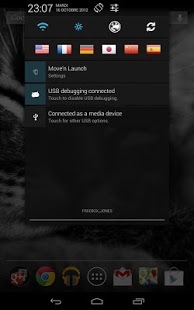
Quick Locale Switcher can run in the background and allows you to switch between your favorite locales with a single press of your finger, by using the notification bar.
If a specific locale isn't in the locale list, you can add it using the custom locale button at the bottom of the locale tab. Try setting your phone's locale in Japanese !
Features :
- Set locale to one of the phone's installed locales.
- Add custom locales.
- Define up to 6 favorite locales.
- Switch between locales using the notification bar.
Coming soon :
- App widget
About Quick Locale Switcher
The company that develops Quick Locale Switcher is Toop. The latest version released by its developer is 1.2. This app was rated by 1 users of our site and has an average rating of 5.0.
To install Quick Locale Switcher on your Android device, just click the green Continue To App button above to start the installation process. The app is listed on our website since 2012-12-20 and was downloaded 74 times. We have already checked if the download link is safe, however for your own protection we recommend that you scan the downloaded app with your antivirus. Your antivirus may detect the Quick Locale Switcher as malware as malware if the download link to com.toop.quicklocaleswitcher is broken.
How to install Quick Locale Switcher on your Android device:
- Click on the Continue To App button on our website. This will redirect you to Google Play.
- Once the Quick Locale Switcher is shown in the Google Play listing of your Android device, you can start its download and installation. Tap on the Install button located below the search bar and to the right of the app icon.
- A pop-up window with the permissions required by Quick Locale Switcher will be shown. Click on Accept to continue the process.
- Quick Locale Switcher will be downloaded onto your device, displaying a progress. Once the download completes, the installation will start and you'll get a notification after the installation is finished.
Program Details
System requirements
Download information
Pricing
Version History
version 1.2
posted on 2012-12-20
Now working on 4.2 !,Because of recent changes, the application must be copied to the /system/app directory. To do so, your device must be rooted.,1- Root your device,2- Copy the .apk to /system/app using ES File Explorer or an other file manager.,3 - Restart your device,4 - Launch the app
version 1.2
posted on 2012-12-20
Several fixes and updates
